PeopleSoft Tricks PeopleSoft Tricks

Menu Search
  • PeopleSoft Tricks
  • About PeopleSoft Tricks
  • Contact Us
  • RSS
  • Free Resources
  • YouTube Channel
  • Tricks
    • App Engine
    • Debugging
    • ERD
    • ExcelToCI
    • nVision
    • PeopleCode
    • PSQuery
    • PUM
    • SQL
    • SQR
    • Upgrades
    • XML/BI Publisher
  • About PeopleSoft Tricks

SQR to Excel Writer

  • Created: February 23, 2017
  • Last Modified: May 3, 2018

Gives developers a library of SQC functions to be used in their SQR to produce Rich Excel reporting.

Checkout Added to cart

↑ Back to topShare on Twitter
Related Articles

Oracle SQL V$Oracle SQL V$
Left Outer Join TricksLeft Outer Join Tricks
Finding Number of Days Between Two DatesFinding Number of Days Between Two Dates
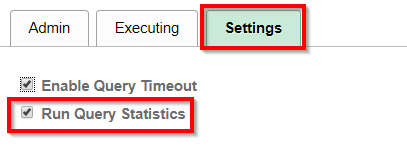
Query Stats and LoggingQuery Stats and Logging
Part 5 - Switch Over To VirtualBox ImagePart 5 - Switch Over To VirtualBox Image
Find Translates and Prompt Tables Via SQLFind Translates and Prompt Tables Via SQL
Part 4 - Run psft-dpk-setup BatchPart 4 - Run psft-dpk-setup Batch
XML Publisher PrimerXML Publisher Primer
Part 6 - Answer More QuestionsPart 6 - Answer More Questions
Part 3 - Unzip PUM File 1Part 3 - Unzip PUM File 1

Post navigation

Previous Post: Monitoring Tool Plugin
Next Post: How To: PeopleSoft Item Load via Excel To Component Interface

↑ Back to top

↑ Back to top
  • Free Resources
  • YouTube Channel
  • Tricks
    • App Engine
    • Debugging
    • ERD
    • ExcelToCI
    • nVision
    • PeopleCode
    • PSQuery
    • PUM
    • SQL
    • SQR
    • Upgrades
    • XML/BI Publisher
  • About PeopleSoft Tricks
  • Free Resources
  • YouTube Channel
  • Tricks
    • App Engine
    • Debugging
    • ERD
    • ExcelToCI
    • nVision
    • PeopleCode
    • PSQuery
    • PUM
    • SQL
    • SQR
    • Upgrades
    • XML/BI Publisher
  • About PeopleSoft Tricks
↑ Back to top

Tags

applicationengine debug nvision peoplecode query trees upgrade
© 2026 PeopleSoft Tricks Theme by wpforests
  • About PeopleSoft Tricks
  • Contact Us
↑ Back to top